
Google Maps Driving Mode Discontinued: What It Means for Users and Alternatives
For years, Google Maps Driving Mode was a reliable companion for drivers across the globe. Whether you were heading to work, navigating a new city, or simply taking a road trip, this feature offered a streamlined way to access navigation, real-time traffic updates, and important alerts while on the road. However, Google recently announced that Google Maps driving mode has been discontinued, leaving many users confused and searching for alternatives.
In this article, we will explore why Google made this decision, what changes users can expect, and the best alternatives available for safe and efficient navigation.
What Was Google Maps Driving Mode?
Google Maps Driving Mode was essentially a hands-free driving assistant designed to reduce distractions on the road. Introduced as part of Google Assistant, this feature automatically launched when your phone connected to your car’s Bluetooth or when you started driving.
Some of its key features included:
-
Quick access to navigation – without manually entering commands.
-
Real-time traffic alerts – warnings about congestion, accidents, and road closures.
-
Voice commands via Google Assistant – allowing drivers to call contacts, play music, or send messages without touching their phones.
-
Minimalist interface – with large buttons and simplified menus tailored for driving.
The feature was particularly loved by those who wanted a safer and distraction-free experience while still enjoying the power of Google Maps.
Why Was Google Maps Driving Mode Discontinued?
Google has a history of launching innovative products and later phasing them out, and driving mode became the latest victim of this strategy. While Google has not given a highly detailed explanation, several factors contributed to its discontinuation:
-
Shift Toward Android Auto and Google Built-In
Google is heavily investing in Android Auto and its newer Google Built-In platform for vehicles. These systems are designed to fully integrate with cars, offering drivers a richer experience than the standalone driving mode. By focusing resources on Android Auto, Google likely aims to provide a more consistent ecosystem. -
Low Adoption Rate
While many users found driving mode useful, overall adoption was relatively low compared to Google’s other services. Features like turn-by-turn navigation and Assistant commands were already available in standard Google Maps, making driving mode somewhat redundant for casual users. -
Simplification of Services
Google has been consolidating its apps and services to avoid overlap. Removing Google Maps driving mode simplifies its navigation offerings while encouraging users to adopt Android Auto or built-in car displays.
How Users Are Affected
With Google Maps driving mode discontinued, users who relied on it may face some inconvenience, especially those without Android Auto-compatible cars. Here are some of the main changes:
-
No dedicated driving interface: Users now need to manually start navigation from Google Maps.
-
Fewer hands-free shortcuts: While Google Assistant still works, the seamless driving-focused UI is gone.
-
Increased reliance on car systems: Users with newer vehicles may transition to Android Auto or Google Built-In, but older car owners may feel left behind.
Alternatives to Google Maps Driving Mode
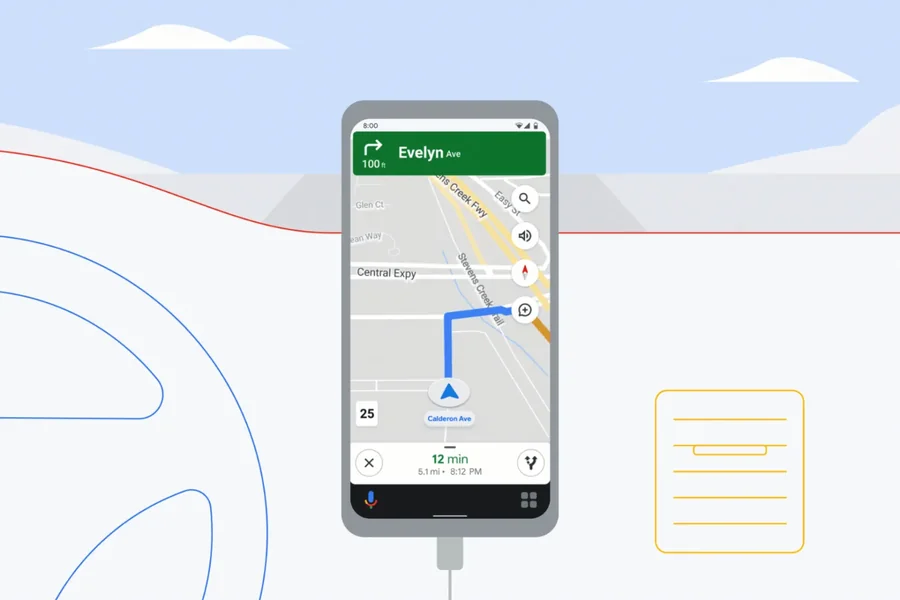
Even though Google Maps driving mode is no longer available, there are several great alternatives to ensure safe and efficient driving experiences.
1. Android Auto
Google is clearly steering users toward Android Auto, which offers a comprehensive dashboard experience on supported cars. It provides:
-
Navigation via Google Maps or Waze.
-
Music and podcast integration with Spotify, YouTube Music, and others.
-
Voice controls through Google Assistant.
-
Messaging support via WhatsApp, Telegram, and SMS.
If your car supports Android Auto, this is the closest and most powerful replacement.
2. Google Maps Standard Navigation + Assistant
Even without driving mode, Google Maps itself is still incredibly powerful. You can:
-
Launch navigation manually.
-
Use “Hey Google” commands for hands-free controls.
-
Get real-time traffic and rerouting.
While not as streamlined as driving mode, this combination remains highly functional.
3. Waze
Also owned by Google, Waze is a popular navigation app that provides:
-
Real-time, crowd-sourced traffic data.
-
Speed camera alerts and hazard reports.
-
A community-driven approach that often updates faster than Google Maps.
For drivers who loved the simplicity of driving mode, Waze offers a highly interactive experience.
4. Apple CarPlay (for iPhone users)
For those using iPhones, Apple CarPlay is a strong alternative. It provides integration with Apple Maps, Google Maps, or Waze, along with voice controls via Siri.
5. Dedicated Car Navigation Systems
Some drivers may opt for standalone GPS devices from brands like Garmin or TomTom. While less common today, these devices can still be valuable for those who prefer not to rely on smartphones.
Tips for Adapting After Driving Mode’s Removal
If you’re struggling to adjust after the discontinuation, here are some practical tips:
-
Set Up Voice Shortcuts
Use Google Assistant commands like:-
“Hey Google, navigate to work.”
-
“Hey Google, play my driving playlist.”
-
-
Use Quick Access Widgets
Add Google Maps widgets to your home screen for one-tap navigation. -
Explore Android Auto-Compatible Accessories
Even if your car doesn’t support Android Auto, you can purchase third-party head units or adapters that enable it. -
Experiment with Waze
Many former driving mode users find Waze’s user-friendly interface to be a suitable replacement.
The Bigger Picture: Google’s Evolving Mobility Strategy
The Google Maps driving mode discontinued update reflects a larger trend in Google’s mobility strategy. The company is increasingly focusing on in-car integration rather than smartphone-only solutions. As cars become more connected, Google wants to position itself as a leader in smart vehicle technology through Android Auto and partnerships with major automakers.
While this shift benefits those with modern cars, it does highlight a gap for users of older vehicles who valued driving mode’s simplicity. Google may address this in the future, but for now, drivers must adapt with the available alternatives.
Conclusion
The news that Google Maps driving mode has been discontinued marks the end of a convenient feature that many drivers relied upon. While its removal may feel inconvenient, users still have access to powerful navigation tools through Google Maps, Waze, and Android Auto.
For those seeking a seamless hands-free driving experience, Android Auto stands out as the most robust replacement. However, everyday drivers can still achieve similar functionality by combining Google Maps with voice commands and widgets.
Ultimately, this decision underscores Google’s push toward more integrated, car-focused ecosystems, suggesting that the future of navigation lies not just in smartphones, but in smarter, fully connected vehicles.